

Enterprise · Code references
Code references
Your CI tells FluxGate where each flag appears in code, so cleanup starts from a list of files and lines instead of a search.
Video coming soon
Code references
Before you start
- Your install has the Business or Enterprise edition (entitlement
code_references). Reading and deleting stored references works in every edition. - You can create a system client in the team that owns the flags System admin or as a Team Admin.
- Your repositories build in GitHub Actions or GitLab CI, or another CI that can run a Linux or macOS binary.
Why code references
Flags pile up. A release flag reaches 100 %, and the if stays in the code for months. Each forgotten flag is a branch nobody tests, a key someone can still flip by mistake, and a line of targeting rules that edges keep in memory. To clean up, you need two facts side by side for every flag:
- Is it still evaluated? FluxGate already records this on each flag: when it was last evaluated, and how often in the last 7, 30 and 90 days.
- Where is it in the code? Code references add this answer.
With both, FluxGate can tell you which flags are safe to archive, which ones need a code change first, and which ones still matter.
How it works
- A scanner, the
fluxgate code-refs scancommand, runs in your CI on every push to the default branch. - It asks FluxGate for the team's flag keys, archived flags included, and for the keys deleted in the last 90 days.
- It walks the checkout, finds every use of those keys, and classifies each one as an SDK call, a literal or an alias of a constant.
- It uploads one scan per repository and branch: file paths, line numbers, the kind of each match and a few redacted lines around it. It never sends whole files.
- FluxGate replaces that branch's earlier scan with the new one, and shows the result on the feature page, in the feature list, in Settings, Code references, and in the cleanup report.
The scan finds the repository, branch and commit from the CI variables of GitHub and GitLab, or from the checkout's .git folder. The repository name is the remote without scheme, credentials, port or .git: https://x-access-token:...@github.com/juniper-market/storefront.git becomes github.com/juniper-market/storefront. For github.com and gitlab.com the scan also sets a link template, so each line on the feature page links to the file.
What you see in FluxGate
On each flag
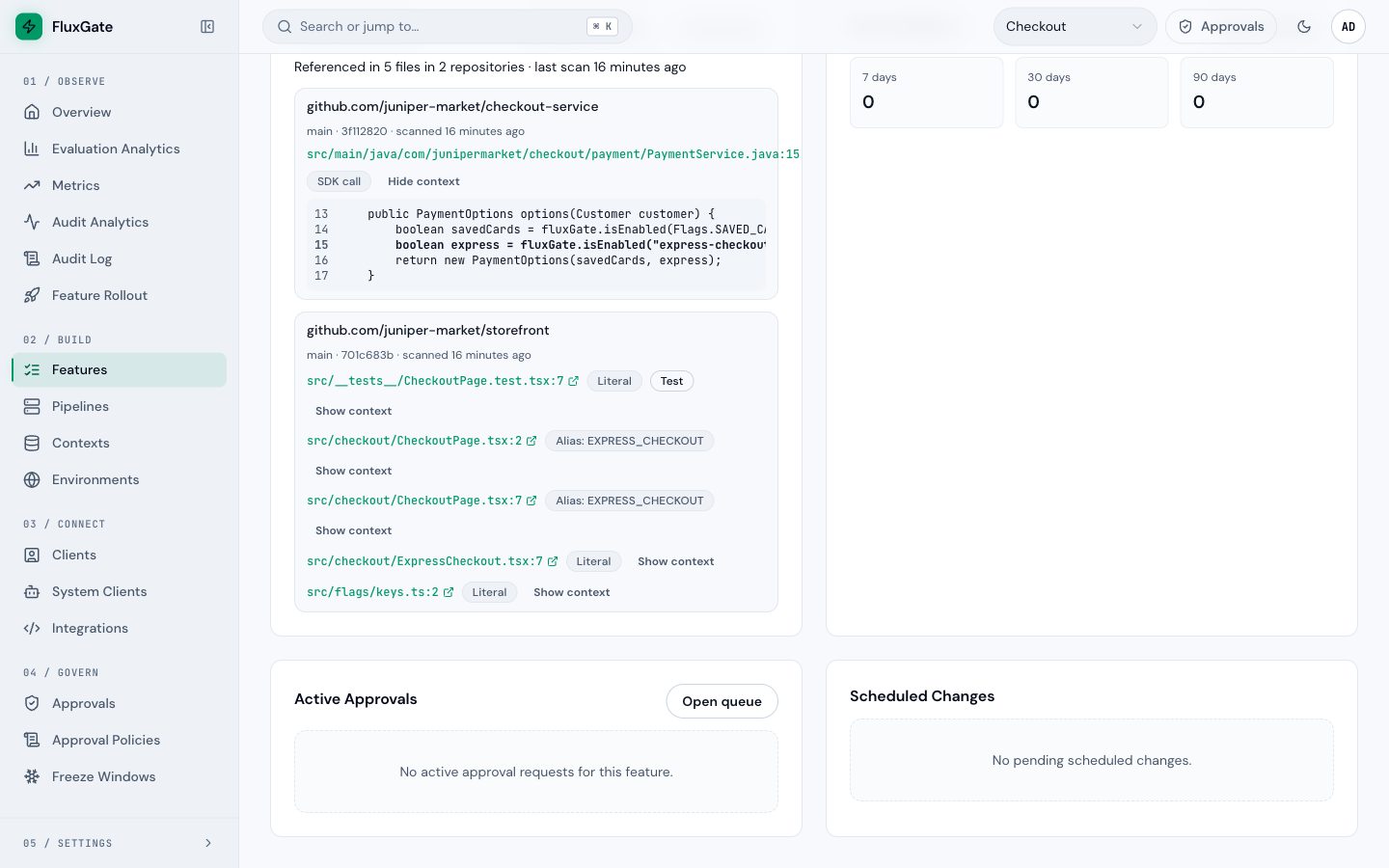
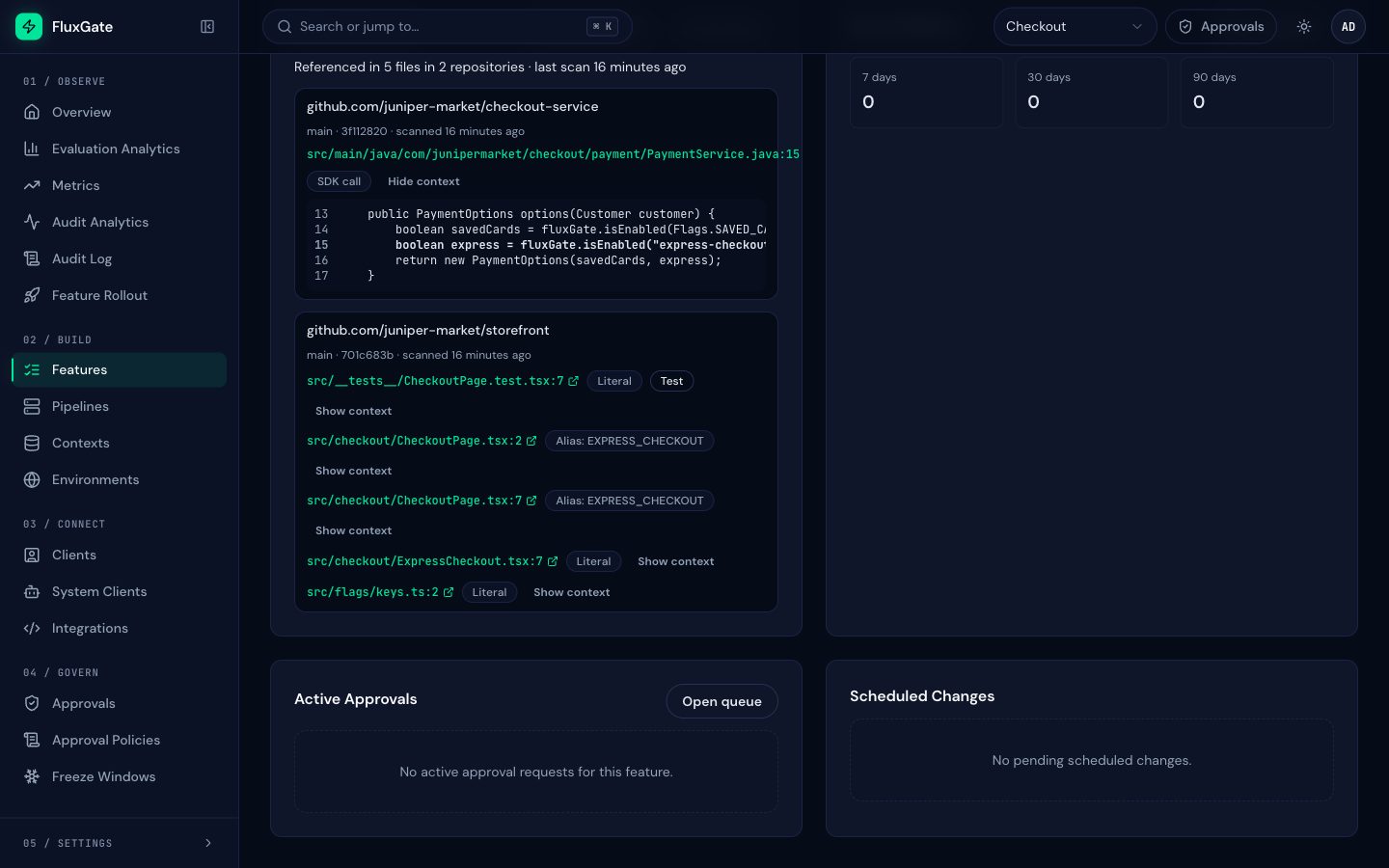
The flag page has a Code references card. It says, for example, "Referenced in 5 files in 2 repositories", lists each repository with its branch, commit and scan age, and each match with its kind. Show context opens the redacted lines around the match. Each path links to the line in your Git host.
 (opens full size in a new tab)
 (opens full size in a new tab)
Code references on the feature page explains every part of the card, the repository settings and the feature list filter.
For the whole team
Settings, Code references lists the scanned repositories, their default branch, link template, last scan and coverage. Features, Cleanup report turns evaluations, references and coverage into one recommendation per flag: see The cleanup report.
Set it up
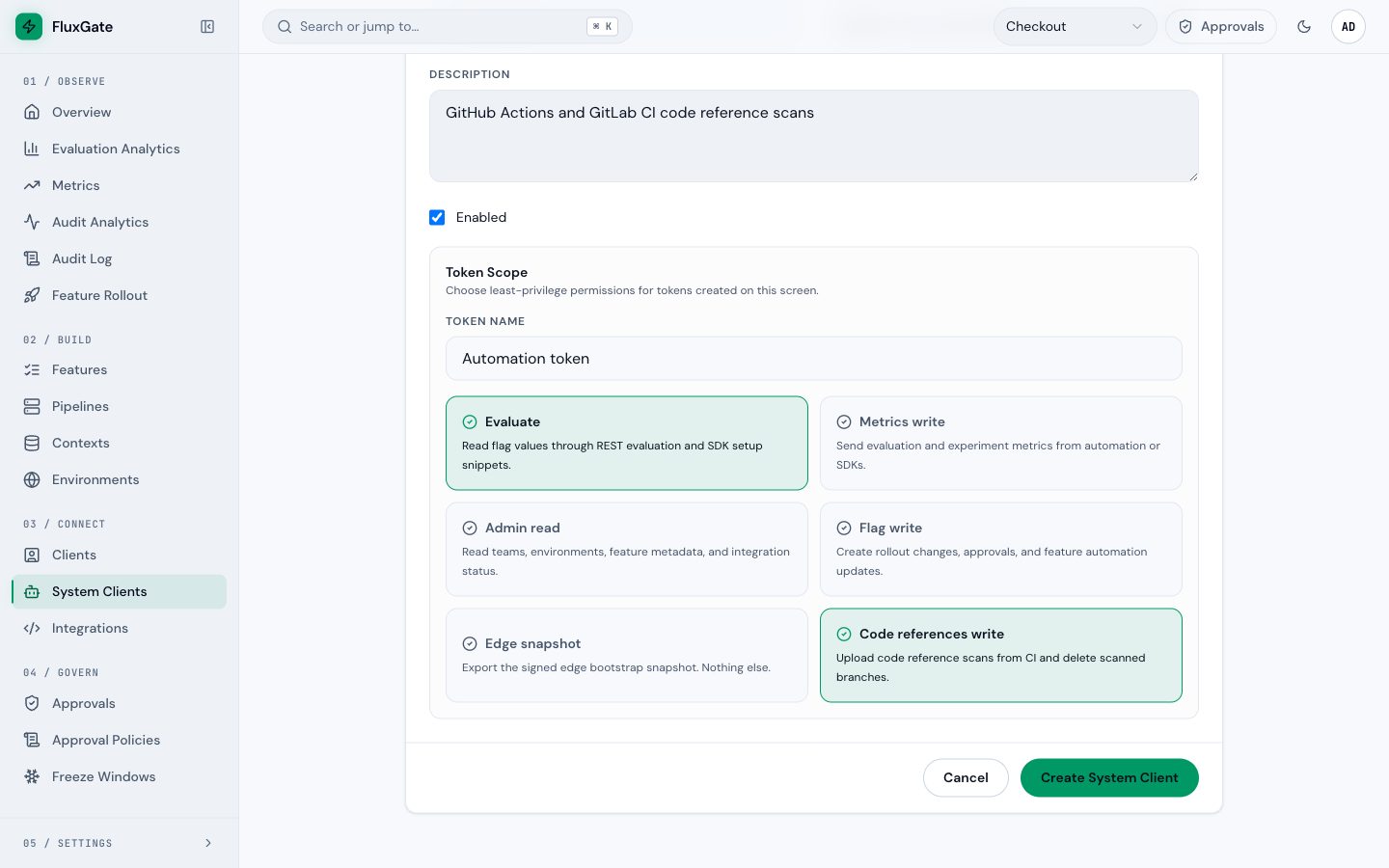
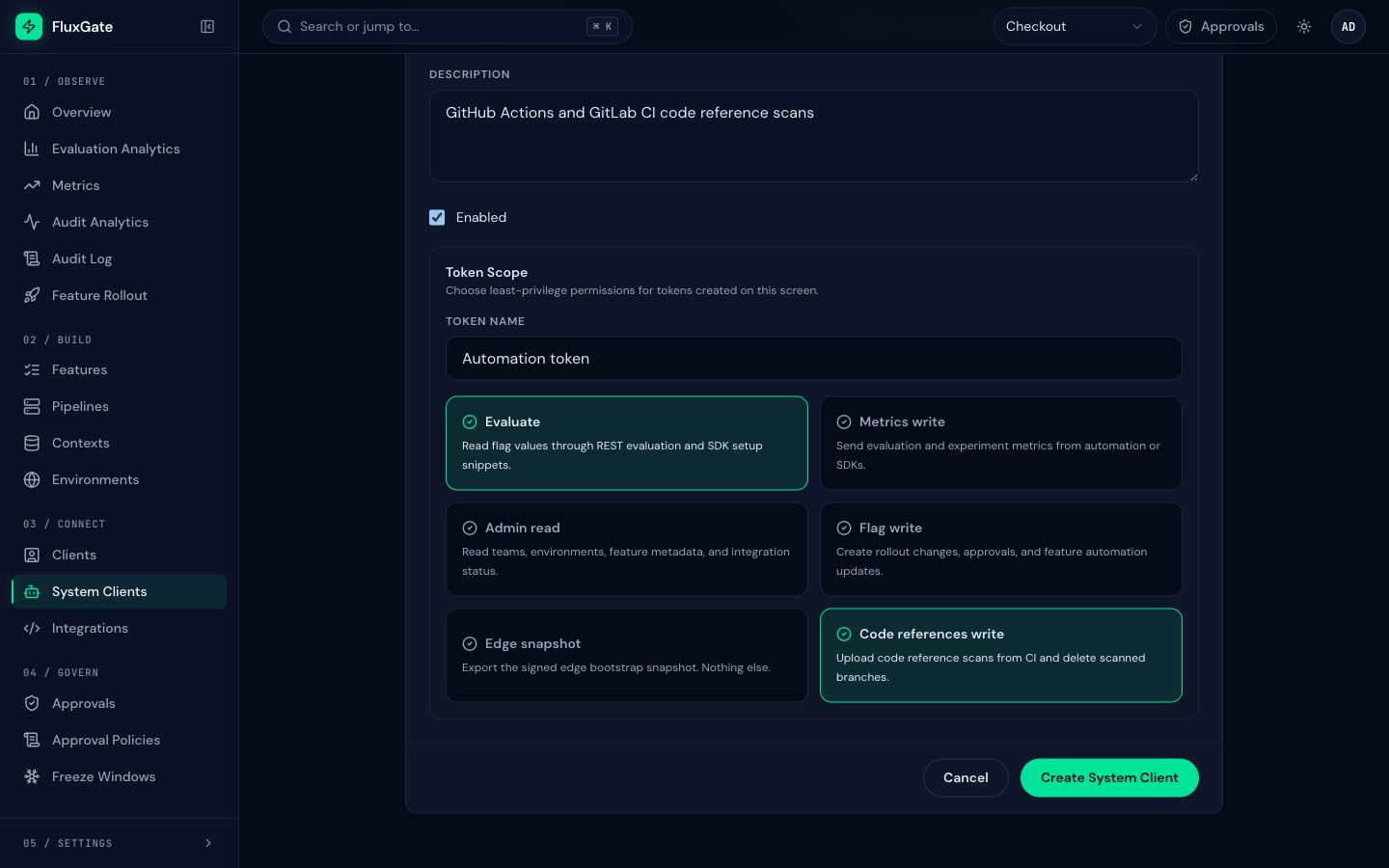
- Open System Clients under Connect and click Create System Client. Name it
ci-code-refs. - Under Token Scope, select Evaluate and Code references write, and clear the other scopes. Evaluate lets the scanner list the team's flag keys. Code references write lets it upload scans and delete scans of deleted branches. Neither is enough alone.
- Create the client and copy its token. It is shown once.
- Add the FluxGate CI template to each repository: GitHub Actions or GitLab CI.
- Push to the default branch. The job downloads the
fluxgateCLI, checks it againstSHA256SUMS, scans and uploads. - Open a flag in FluxGate. The Code references card lists where the flag is used.
 (opens full size in a new tab)
 (opens full size in a new tab)
Code references write is not a default scope, so select it on purpose. A token with only Evaluate cannot read stored code lines; reading them needs Code references write or Admin read.
Each upload replaces the earlier scan of that repository and branch. A repository whose default branch was not scanned for 7 days (the backend's coverage_days) shows Not scanned recently, so you know when the list may be out of date.
Try a scan by hand
Download the fluxgate CLI from Download binaries, then run it in a checkout with the system client token:
export FLUXGATE_URL=https://flags.junipermarket.example/api/v1
export FLUXGATE_TOKEN=<ci-code-refs token>
fluxgate code-refs scan --dry-run
--dry-run prints what would be uploaded. Without it, the scan uploads and prints the server's answer:
{
  "branch": "main",
  "deletedKeys": ["beta-coupons"],
  "featuresReferenced": 5,
  "refCount": 12,
  "repositoryId": "c55b312e-aec2-432c-bba5-1afa9f5e419d",
  "unknownKeys": ["beta-coupons"]
}refCount: references stored for this branch.featuresReferenced: flags of the team that the branch references.unknownKeys: keys found in the code that name no flag of the team. A deleted flag's key is one of them.deletedKeys: keys of flags deleted from the team in the last 90 days that the code still uses. The scan also prints1 references to 1 deleted flags: beta-coupons.
fluxgate code-refs repos lists the repositories that were scanned, their branches and when each was last scanned.
All scan options
fluxgate code-refs scan [--dir .] [--repo NAME] [--branch NAME] [--commit SHA]
                        [--default-branch NAME] [--browse-url TEMPLATE]
                        [--context-lines 0..5] [--redact REGEX]... [--exclude GLOB]...
                        [--config .fluxgate/code-refs.toml] [--dry-run] [--strict]
The scan takes the repository, branch and commit from the flags first, then from CI variables (GITHUB_SERVER_URL and GITHUB_REPOSITORY, GITHUB_REF_NAME, GITHUB_SHA; CI_SERVER_HOST and CI_PROJECT_PATH, CI_COMMIT_REF_NAME, CI_COMMIT_SHA, CI_DEFAULT_BRANCH), then from the checkout's .git folder. For a host other than github.com or gitlab.com, pass a link template, for example --browse-url "https://git.junipermarket.example/shop/storefront/src/{commit}/{path}#L{line}". The template must use http or https and contain {path}; it may also use {commit}, {branch} and {line}.
What is stored
Per scan: repository name, link template, branch, commit, file path, line, match kind, test mark, the redacted context lines, who uploaded the scan, and counts. Not stored: file contents beyond the context lines, git history, author names.
On a self-hosted install, nothing leaves your network: the scanner talks only to your FluxGate backend. On a hosted install, paths and context lines leave your network; send no code at all with --context-lines 0, or set max_context_lines = 0 on the backend. See What the scanner finds.
Backend settings
Optional [code_refs] section in the backend config.toml:
| Key | Default | Meaning |
|---|---|---|
max_context_lines | 2 | Lines kept above and below a match, at most 5. 0 stores no code |
max_upload_bytes | 10485760 (10 MiB) | Size limit of an upload, after gzip decoding. Larger uploads get 413 payload_too_large |
max_refs_per_upload | 50000 | References in one upload |
coverage_days | 7 | A repository whose default branch was not scanned for this many days counts as not covered |
branch_retention_days | 30 | A daily job deletes scans of non-default branches older than this |
After a downgrade
| What | After a downgrade to Free | In ReadOnly |
|---|---|---|
| Uploads | Refused with 403 license_required. The scanner prints a warning and exits 0, so CI keeps passing (--strict exits 4) | Refused with 403 license_read_only, same scanner behavior |
| Stored references | Readable on the feature page, with their scan age | Readable |
| Coverage | Repositories stop being covered after coverage_days, so the cleanup report says Unknown instead of Archive | Same |
| Deleting repositories and branches | Allowed | Refused, like other team writes |
| Repository settings | 403 license_required | 403 license_read_only |
| Cleanup report, deleted keys, removal checklist | Work | Work |
Next
See everything the feature page shows: Code references on the feature page.