

Enterprise · Edge resilience
Signed bootstrap snapshots
The backend signs a snapshot of a team, you publish it, and a brand-new edge can start from it while the backend is down.
Video coming soon
Signed bootstrap snapshots
Before you start
- Your license has the
edge_resilienceentitlement (Enterprise). Only creating the first signing key checks it. - The backend has
FLUXGATE_ENCRYPTION_KEYset. It seals the private signing key. Without it, creating a key fails with400 encryption_key_missing. - You can sign in as
adminSystem admin. Only system admins manage signing keys. - Your edges already use a local snapshot. A bootstrap file is for the edges that do not have one yet.
When you need a bootstrap file
A local file covers an edge that restarts. It does not cover an edge that has never run, or one whose disk is empty:
- a new edge that an autoscaler starts during an outage;
- a Kubernetes pod rescheduled to a node without its volume;
- a site that has no path to the backend at times.
A bootstrap file is a snapshot of one team that the backend signs. Any edge that trusts the signing key can load it, check that it is genuine and recent, and start serving.
Signing key (backend)
One active Ed25519 key. The private key is sealed withFLUXGATE_ENCRYPTION_KEY.Export job (your automation)
Calls the export API with a token that has theedge:snapshotscope, verifies the file, uploads it.Private bucket or path
Where edges read the bootstrap file during an outage.Edge server
Trusts the keys intrusted_keys, copied from the Snapshot keys tab.snapshot.dir
Each edge writes its own local file while streaming and reads it at startup.
Create a signing key
A signing key is an Ed25519 key pair. Its ID is esk_ followed by the first 16 hex characters of the SHA-256 hash of the public key. At most one key is active at a time. Retired keys stay in the list and never sign again. The private key never leaves the backend.
- Sign in as
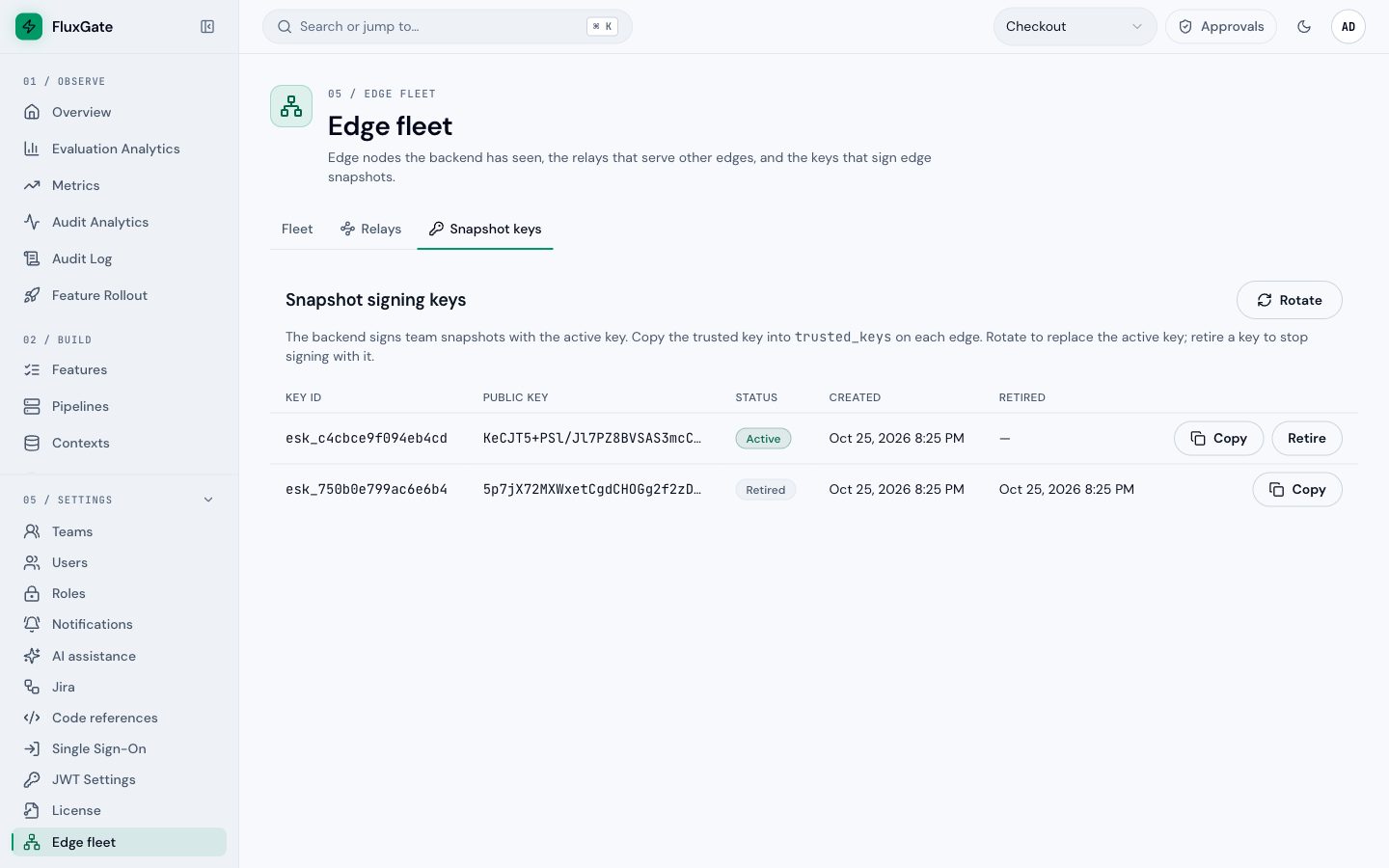
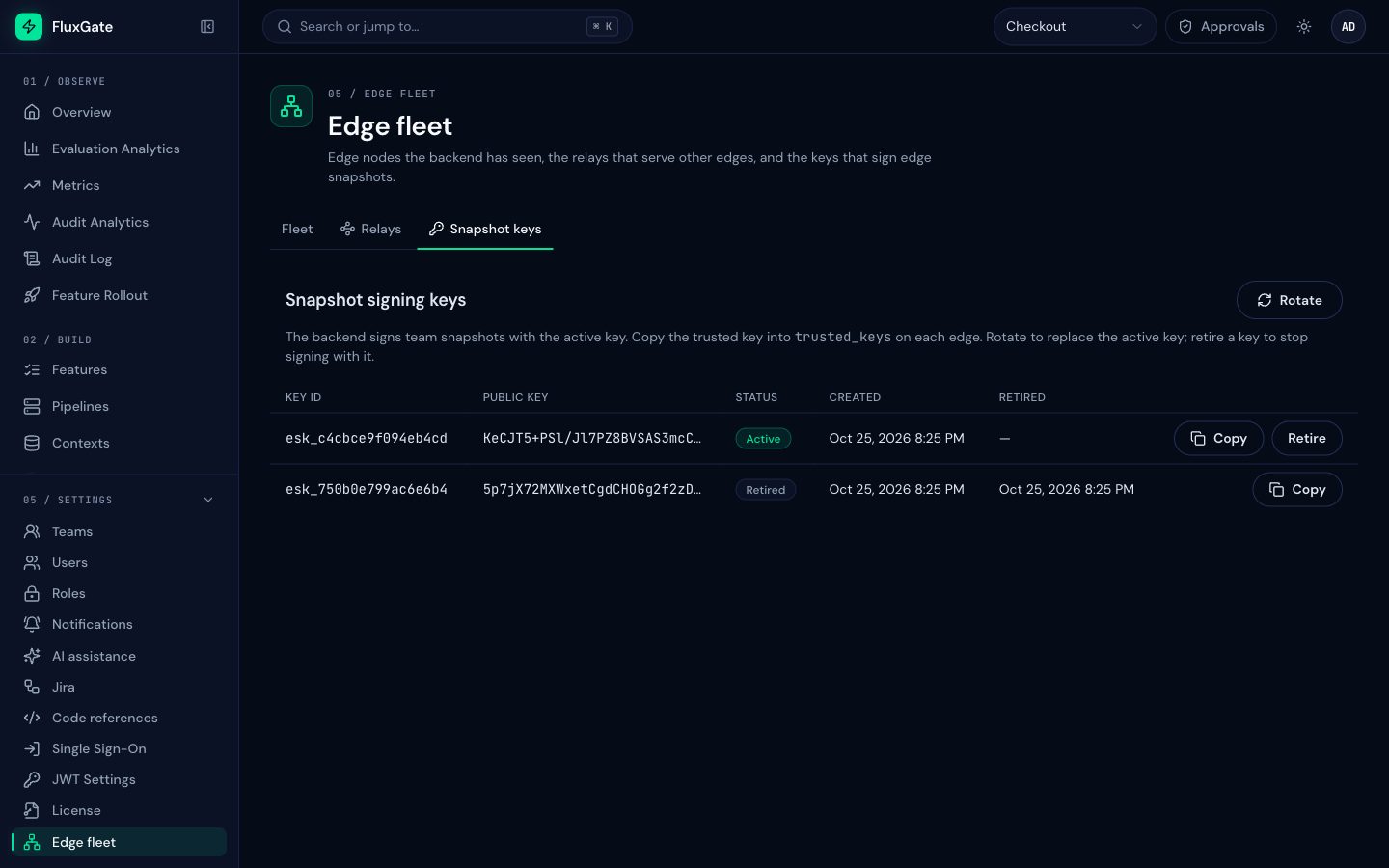
adminSystem admin. - Open Settings, then Edge fleet, then the Snapshot keys tab.
- Create the key. The tab lists it with the status Active.
- Click Copy next to the key. It copies the trusted key, the value
<key ID>:<public key>, that you put on every edge.
 (opens full size in a new tab)
 (opens full size in a new tab)
The same actions are in the REST API. Every response holds public data only.
| Action | Request |
|---|---|
| List keys, newest first | GET /api/v1/edge/snapshot-keys |
| Create the first key | POST /api/v1/edge/snapshot-keys with {"rotate": false} |
| Rotate: new active key, old key retired, in one transaction | POST /api/v1/edge/snapshot-keys with {"rotate": true} |
| Retire a key | DELETE /api/v1/edge/snapshot-keys/{key_id} |
{
  "keyId": "esk_c4cbce9f094eb4cd",
  "publicKey": "<base64 Ed25519 public key>",
  "status": "active",
  "createdAt": "2026-10-25T14:55:12+00:00",
  "retiredAt": null,
  "trustedKey": "esk_c4cbce9f094eb4cd:<base64 Ed25519 public key>"
}
trustedKey is the exact value for the trusted_keys setting of an edge.
Key errors
| Status and code | When |
|---|---|
400 encryption_key_missing | FLUXGATE_ENCRYPTION_KEY is not set. Reported in the error field, with code set to null |
403 license_required | Creating a first key without the edge_resilience entitlement |
403 policy_denied | The caller is not a system admin |
403 license_read_only | Create or rotate in ReadOnly. Retire stays allowed |
404 snapshot_key_not_found | Retiring an unknown or already retired key |
409 snapshot_key_active | Create while a key is active. Use rotate |
409 snapshot_key_none_active | Rotate while no key is active. Use create |
Export a snapshot
GET /api/v1/teams/{team_id}/edge-snapshot returns the signed snapshot of one team as a binary file (application/octet-stream, file name edge-snapshot-<team_id>.bin). The file holds:
- every feature of the team, exactly as the edge stream sends it;
- the time the backend generated the snapshot;
- the enabled clients of the team, each with its client info and the SHA-256 hash of its SDK key.
Disabled and deleted clients are left out, so revoking a client takes effect at the next export. The file holds no plaintext SDK keys and no users. The signature covers the text fluxgate-edge-snapshot-v1 followed by the SHA-256 hash of the payload.
Who may export:
- system admins;
- members of the team;
- a system client of the team whose token has the scope Edge snapshot (
edge:snapshot). This scope allows the export and nothing else. System clients withadmin:readcan also export, because that scope reaches everyGET.
The export needs no entitlement. It works in every license state while a key is active.
| Status and code | When |
|---|---|
403 policy_denied | Not an admin, not a team member, not a system client of the team |
404 | The team does not exist |
409 snapshot_key_missing | No key is active |
500 | The active key cannot be opened: FLUXGATE_ENCRYPTION_KEY is missing or changed |
Export on a schedule
- Open System Clients under Connect and click Create System Client. Name it
snapshot-export. - Under Token Scope, select only Edge snapshot: "Export the signed edge bootstrap snapshot. Nothing else."
- Create it, and store the token in a file that only the export job can read.
- Run the export from a scheduler, for example every 15 minutes. Verify the file, then publish it.
FLUXGATE_URL=https://flags.junipermarket.example/api/v1
FLUXGATE_TOKEN=<snapshot-export system client token>
TEAM_ID=<Checkout team ID>#!/bin/sh
set -eu
. /etc/fluxgate/export.env
out=/srv/snapshots/team-checkout.bin
curl -fsS -H "Authorization: Bearer $FLUXGATE_TOKEN" \
-o "$out.partial" "$FLUXGATE_URL/teams/$TEAM_ID/edge-snapshot"
fluxgate edge snapshot verify "$out.partial" --trusted-key "$(cat /etc/fluxgate/trusted-key)"
mv "$out.partial" "$out"
aws s3 cp "$out" s3://juniper-snapshots/eu/team-checkout.bin*/15 * * * * deploy /usr/local/bin/fluxgate-snapshot-exportset -e stops the script when the export or the check fails, so the last good file stays published. Exporting more often than your flags change is harmless: an edge ignores a file that is not newer than what it has.
The FluxGate CLI can also download the file. It writes <file>.partial and renames it only when the download is complete:
fluxgate edge snapshot export --team checkout --out team-checkout.binVerify a file offline
fluxgate edge snapshot verify checks a file without a login or network access. It exits 0 and prints the team ID, the generation time, the number of features and the key ID. It exits 1 when the file is not a snapshot, no --trusted-key matches its key ID, or the signature is not valid. Repeat --trusted-key for more than one key.
fluxgate edge snapshot verify team-checkout.bin \
  --trusted-key "esk_c4cbce9f094eb4cd:<base64 public key>"
Verify checks the signature only. The edge also checks the team, the rollback floor and the age.
Configure the edge
[snapshot]
dir = "/var/lib/fluxgate/edge"
bootstrap = "https://juniper-snapshots.s3.eu-west-1.amazonaws.com/eu/team-checkout.bin"
trusted_keys = ["esk_c4cbce9f094eb4cd:<base64 public key>"]
startup_wait_secs = 5
max_age_secs = 604800| Setting | Default | Meaning |
|---|---|---|
bootstrap | empty (off) | A file path or an https:// URL. Plain http:// works only for loopback hosts |
trusted_keys | [] | Public keys that may sign a bootstrap file, each <key ID>:<base64 public key>. In the environment, one comma-separated string |
startup_wait_secs | 5 | How long the edge waits for the stream before it reads the file |
max_age_secs | 0 (no limit) | The oldest file the edge accepts, by its generation time. Set it on edges without a local file |
The edge checks trusted_keys at startup, even when bootstrap is empty, so a bad key shows at deploy time and not during an outage. A malformed entry, a key ID that does not match its key, a duplicate, or bootstrap without keys stops the edge with Invalid snapshot configuration: .... The edge reads trusted_keys only at startup: restart the edge after you change it.
How the edge reads the file
The edge waits startup_wait_secs after it starts. If the stream has not completed a snapshot by then, and the stream is disconnected, the edge reads the bootstrap. If the stream is open and still sending its snapshot, the edge waits and tries again. The bootstrap runs once after startup; a later outage does not read it again.
- A path is read from disk. A URL must answer within 10 seconds, body included.
- The edge follows no redirects, and refuses a
text/htmlanswer, which is usually a login page. - Files and answers larger than 64 MiB are refused.
- Logs show the source without user, password, query and fragment, so a presigned URL stays out of the logs.
The checks, in order
The first check that fails rejects the file, and the edge logs one line: Ignoring bootstrap snapshot <source>: <reason>.
- The signature is Ed25519, its key ID is in
trusted_keys, and it is valid. - The file names a team and a generation time.
- The team equals the team the edge already knows, from its local file or an earlier answer of the backend.
- The file is newer than the rollback floor. An older or equal file is ignored with an
infoline. - With
max_age_secsset, the file is not older than that. A file from the future counts as new. - An edge that does not know its team yet accepts the file only if it lists the edge's own client, in the file's team, with the SHA-256 hash of its configured
client_secret.
The last check stops a new edge from serving another team's flags. It also means: export again after you create a client for an edge, rotate its SDK key, or enable it again. Otherwise a new edge with that client refuses the file with the reason does not list this edge's client.
The rollback floor
An old file must never replace newer flags. The floor is the backend time of the last change the edge applied from the stream. Every flag change, heartbeat and full snapshot carries it, and children of a relay get it through the relay. After the edge applies a bootstrap file, the floor is that file's generation time.
The floor lives in the local snapshot file. An edge without snapshot.dir, or with an empty disk, has no floor after a restart, so it accepts any older file within max_age_secs. Set max_age_secs on those edges.
Retries
If the read fails or the file is rejected and nothing is loaded, the edge tries again after 5, 10, 20 and 40 seconds, then every 60 seconds, until a bootstrap is applied or a stream snapshot completes. You can therefore fix the cause during an outage, publish a new file, and the edge picks it up without a restart.
If a local file is already loaded, the edge makes three attempts in total for a failed read, and never retries a rejected file.
After the edge accepts the file
- The edge serves the flags at once.
FluxGate-Config-Sourceisbootstrap, and the age counts from the export time. - It removes flags of a loaded local file that the newer bootstrap does not contain.
- With
snapshot.dir, it keeps the file as its local file, with the original generation time and the sourcebootstrap. A restart then loads it again and still reportsbootstrap, and the same bootstrap is not applied twice. - The next complete stream snapshot replaces it, and the source becomes
stream.
Team correction
The team in a file is provisional. When the backend is reachable, the edge asks it for the team of its client. If the backend names another team, the backend wins: the edge logs an error, drops the loaded flags, assignments and snapshot state, deletes the local file, and serves the backend's team.
Client keys from a bootstrap file
While the backend is unreachable, the edge hashes each presented SDK key with SHA-256 and compares it, in constant time, with the hashes in the applied file.
- A match serves the exported client info. An unknown client, a wrong key, or a client not in the file gets
502. resilience.client_stale_if_error_secsgoverns this too. The window counts from the export's generation time, so an export older than the window authenticates nothing.0turns it off.- A live answer of the backend always wins. An accepted key replaces the exported entry; a rejection removes it.
- A key that was rotated or disabled after the export keeps working while the backend is unreachable, until the backend answers or the window ends.
Rotate a signing key
Rotation retires the old key at once, and edges trust public keys. Update them in this order to avoid a gap:
- Click Rotate on the Snapshot keys tab, or send
POST /api/v1/edge/snapshot-keyswith{"rotate": true}. - Add the new trusted key to
trusted_keyson every edge, next to the old one, and restart the edges. - Export the snapshots again with the new key and publish them.
- When no published file is signed by the old key, remove the old key from
trusted_keys.
If a private key may be exposed, rotate at once. Then replace trusted_keys with the new key only, restart the edges, and export again. An edge that no longer trusts the old key refuses every file signed with it. Retire works in every license state, including ReadOnly, so you can always take a key out of service.
Retiring the only active key leaves the backend without a signing key. Exports then fail with 409 snapshot_key_missing until you create a key again, and that needs the entitlement.
Treat snapshot files as confidential
- Keep the bucket private, and restrict reads to the edges and the people who run them. Use
https://. - A presigned URL must still be valid when an outage happens. Use a long expiry, or a private bucket path with a network rule. Keep presigned URLs out of logs and tickets.
- Store the
edge:snapshottoken like a credential: it can export every day. - Everyone who may export receives the key hashes: team members, system clients with
admin:readoredge:snapshot, and admins.
Audit entries
The export writes edge_snapshot_exported, at most once per user or system client and team per hour, with the team, key ID, feature count, client count and the kind of caller. Key changes write edge_snapshot_key_created, edge_snapshot_key_rotated and edge_snapshot_key_retired in the same transaction as the change. A refused first key writes license_deny. See Audit log.
Troubleshooting
An edge ignores the bootstrap file
Read the reason in the Ignoring bootstrap snapshot line. The usual causes:
signed with an untrusted key: the edge does not trust the key that signed the file. Add the trusted key and restart, or export again with a trusted key.- The file is for another team: point
bootstrapat the export of the edge's team. - The file is not newer than the edge's flags: nothing to do, the edge already has newer flags.
- The file is older than
max_age_secs: publish a fresh export.
A new edge says the file does not list its client
The edge has no local file, so it needs proof that the file belongs to its team, and that proof is its own client in the file. Check these causes:
- The file belongs to another team.
- The client was created, rotated or enabled again after the export. Publish a new export.
- The edge uses the wrong
client_idorclient_secret.
The edge retries the read, so a new file applies without a restart.
The export fails with 409 or 500
409 snapshot_key_missing: no key is active. Create one. 500: the backend cannot open the active key, because FLUXGATE_ENCRYPTION_KEY is missing or changed. Restore the old value, or rotate the key.
Next
Cut the number of streams per region with Relay edges.