

Enterprise · Single sign-on and SCIM
SCIM provisioning
With SCIM, the identity provider owns every account, a deactivation at the IdP ends FluxGate access at once, and pushed groups can drive roles before anyone signs in.
Video coming soon
SCIM provisioning
Before you start
- Your license includes Single sign-on and SCIM provisioning (Enterprise, or Business with both add-ons). Check it under Settings, License.
- An SSO provider exists for the IdP: OpenID Connect or SAML 2.0. It can stay disabled while you set up SCIM.
public_base_urlis set inconfig.toml, and the IdP can reach that address.- At least one enabled break-glass admin with a password exists. FluxGate refuses to create a SCIM token without one.
- Sign in as
adminSystem admin.
For a complete, tested walk-through with Okta (sign-in app, provisioning app, groups and the full lifecycle), see FluxGate with Okta.
How SCIM works in FluxGate
FluxGate is a SCIM 2.0 service provider (RFC 7643 and RFC 7644). The IdP calls FluxGate whenever a person or a group changes. Nobody touches FluxGate to add, change or remove an account.
- One SCIM service per SSO provider. Each SCIM token belongs to one provider. The token decides which provider a request is for. A token reaches the SCIM endpoints and nothing else.
- SCIM-managed users. A user that the IdP created through SCIM is SCIM-managed. A token sees and changes only the SCIM-managed users of its own provider. Local users, break-glass admins, system clients and users of other providers do not exist for it.
- No passwords. SCIM users sign in through SSO only. They have no FluxGate password.
- The SSO switch does not stop SCIM. Enabled on the provider controls sign-in only. You can provision people before you turn sign-in on, and deactivations keep arriving while sign-in is off. To stop SCIM, revoke the provider's tokens.
The service covers Users and Groups. Bulk operations, /Me, sorting, ETags and password sync are not supported, and the discovery endpoint ServiceProviderConfig says so.
The SCIM base URL
<public_base_url>/api/v1/scim/v2For Juniper Market that is https://fluxgate.example.com/api/v1/scim/v2. The IdP calls these endpoints under it:
| Endpoint | Purpose |
|---|---|
GET /ServiceProviderConfig, GET /ResourceTypes, GET /Schemas | Discovery |
/Users, /Users/<id> | Create, read, replace, update and delete users |
/Groups, /Groups/<id> | Create, read, replace, update and delete groups |
Requests carry the token as a bearer token. Bodies may be application/scim+json or application/json, up to 1 MiB. Without public_base_url, the Provisioning dialog shows "Set public_base_url in the backend config to show the SCIM base URL." and Location headers use the Host header of the request.
Create a token and the link pair
- Open Settings, Single Sign-On. On the row
okta, click the Provisioning icon. The dialog SCIM provisioning for Okta opens. - Next to SCIM base URL, click Copy base URL. Paste it into the IdP's provisioning settings.
- Under Tokens, click Create token. Type a Token name, for example
okta. Set Expires (optional) if your policy needs an expiry. Click Create. - Token created shows the token once, with the hint "Copy the token now and store it in your identity provider." Click Copy token, paste it into the IdP, and click Done.
- Under Link first sign-in to a provisioned user, type the Login claim and choose the SCIM attribute. For Okta:
subandexternalId. See the next section. - Click Save link. The toast "Link settings saved" appears.
- In the IdP, run its connection test. Back in FluxGate, reopen the dialog: Last request shows the test, Last error shows None, and the token shows when it was last used.
Tokens
- A token starts with
fgscim_. FluxGate shows it once and stores only a hash. The token list keeps the name, the prefix, when it was created, when it was last used, and its expiry. - A provider has at most two active tokens (
409 scim_token_limit). Two tokens let you rotate without a gap. - FluxGate accepts the token with or without the
Bearerscheme. Never typeBearerinto an IdP field that adds it itself. - A revoked or expired token gets
401at once. Revoking works in every license state, also in ReadOnly. - The token list warns about a token that expires within 30 days ("Expires in 12 days."), an expired token ("Expired. The IdP gets 401 with this token."), and a token created more than a year ago ("Created more than a year ago. Rotate this token.").
To rotate a token:
- Create a second token and paste it into the IdP.
- Check that Last used of the new token moves when the IdP sends a request.
- Click Revoke on the old token and confirm with Revoke token. The toast "Token revoked" appears. The old token cannot be restored.
Link the first sign-in to a provisioned user
A person that SCIM creates has no SSO identity until their first sign-in. At that sign-in, FluxGate looks for their SCIM user with a pair you choose per provider:
- Login claim: a claim of the sign-in. For OIDC, FluxGate reads it from the ID token, then from userinfo. Default
email. - SCIM attribute:
email,externalIdoruserName. Defaultemail.
| Identity provider | Login claim | SCIM attribute | Why |
|---|---|---|---|
| Okta (OIDC) | sub | externalId | Okta sends its user ID (00u…) as externalId, and the same ID is the sub of every sign-in. It survives email changes. The default pair also works, because Okta sends email_verified. |
| Microsoft Entra ID (OIDC) | oid | externalId | Entra sends no email_verified, so the default pair never links. Map externalId from objectId in Entra. This is also the safe choice for a multi-tenant issuer. |
| SAML providers | An attribute name, or name_id | externalId | The login claims are the assertion attributes by their exact names, plus email (the resolved email) and name_id. There is no sub. To link on a stable ID, have the IdP send it as an attribute. |
Rules:
- The match needs a live SCIM user of this provider. A match on
emailoruserNameignores case. A match onexternalIdis exact. - A match links without Link to existing accounts by email, because the SCIM record came from the same IdP. The audit entry
sso_identity_linkedcarries"via": "scim". - When the login claim is
email, the sign-in needs a verified email, whatever SCIM attribute you pair it with. For SAML, Assume IdP emails are verified decides. Allowed email domains still runs first. - If no SCIM user matches, the sign-in continues as before: linking by email, then account creation.
Users
FluxGate stores these SCIM attributes:
| SCIM attribute | In FluxGate |
|---|---|
id | The FluxGate user ID. Read-only. |
userName | Required, unique per provider, ignoring case. A change does not rename the FluxGate username. |
externalId | Optional, unique per provider. |
name.givenName, name.familyName | First and last name. They fall back to displayName, then the part of the email before the @. |
displayName | Stored and returned. |
emails | The primary email, else the first. Required and unique across all users. Its type must be work or missing. |
active | The IdP's active flag. Missing on create means true. |
groups | The groups of the user. Read-only: membership changes go through /Groups. |
FluxGate ignores other attributes, such as title, phoneNumbers and the enterprise extension (department, manager). A change to password fails with 400 invalidPath. Filters support eq on userName, externalId, id, emails.value and active, joined with and. Paging uses startIndex and count (default 100, at most 200).
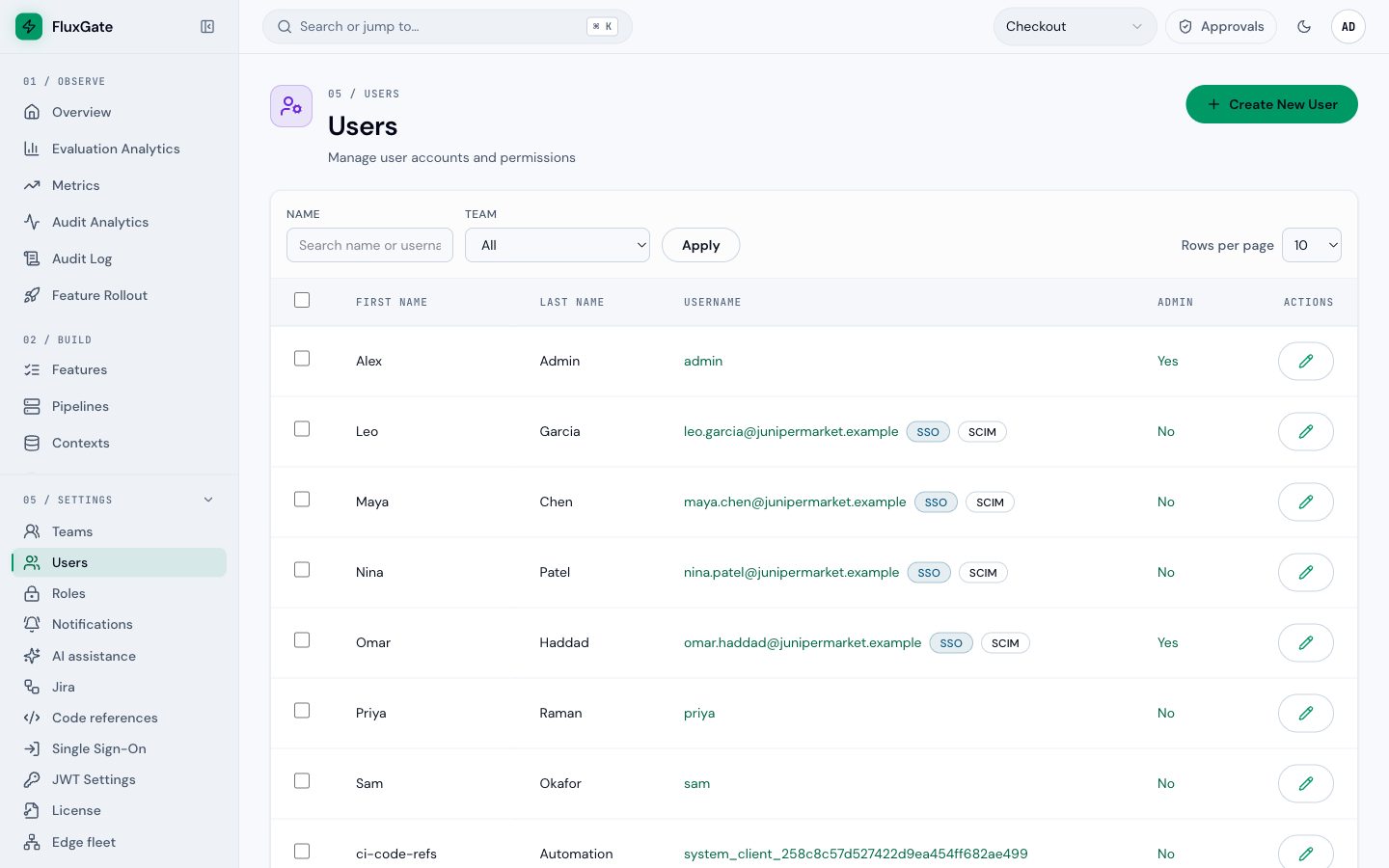
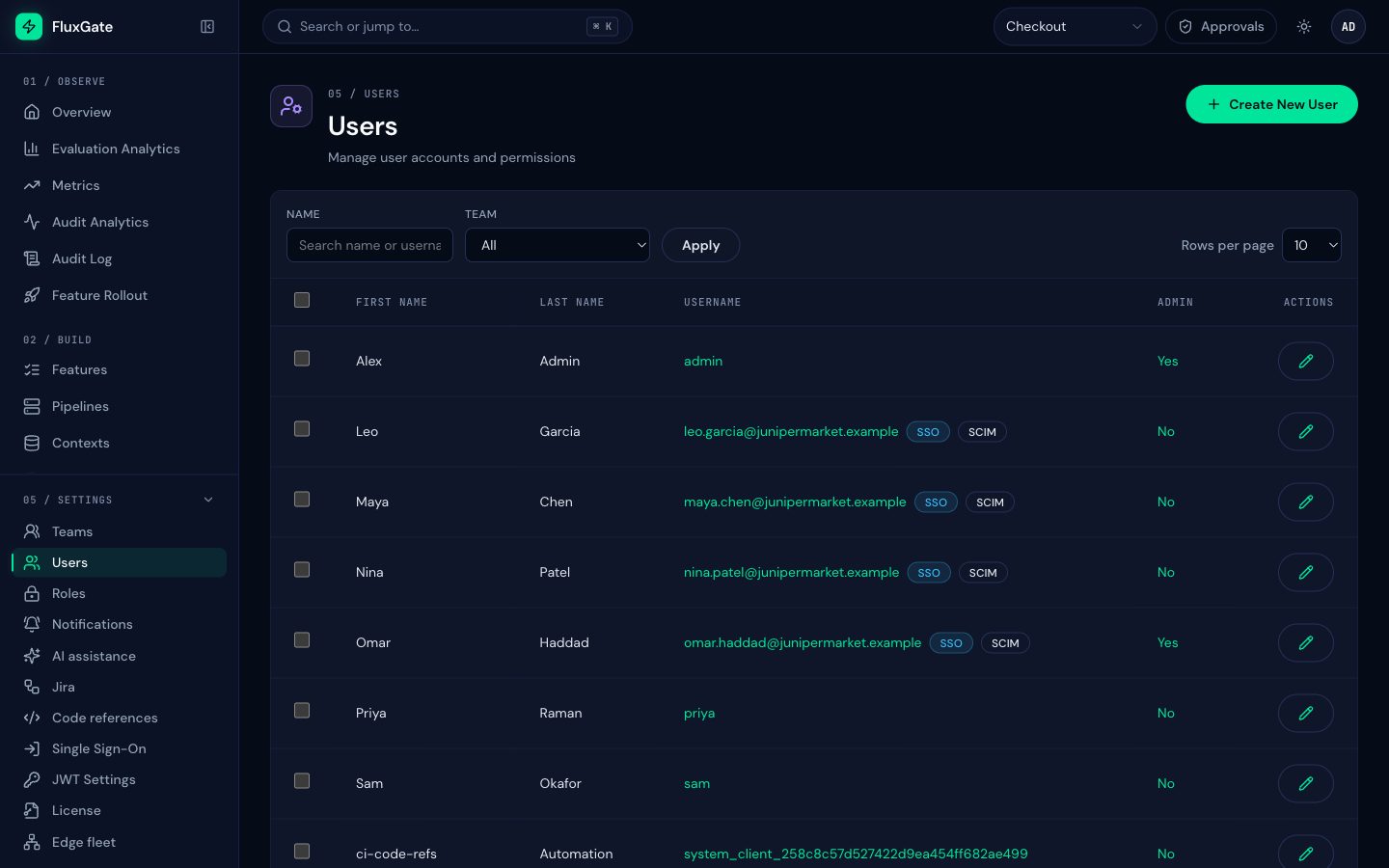
In Settings, Users, people created by SCIM carry a SCIM badge next to the SSO badge.
 (opens full size in a new tab)
 (opens full size in a new tab)
The IdP owns the profile
An admin cannot change the first name, last name or email of a SCIM-managed user: the change fails with 409 scim_managed, and the user page shows the chip "Managed by SCIM provisioning". Roles and teams follow the rules for SSO-managed users. An admin cannot set or reset a password for a SCIM user.
The user lifecycle
Juniper Market hires maya.chen@junipermarket.example, moves her between groups, and later offboards her. Each step happens in the IdP. FluxGate follows.
| In the IdP | FluxGate receives | Result in FluxGate | Audit entry |
|---|---|---|---|
| Joiner: assign Maya to the app, or to an assigned group | A lookup by userName, then POST /Users | Account created, enabled, without a password and not an admin. With role sync SCIM, she gets the roles and teams of her groups before she signs in. | scim_user_created |
| Profile change: change her last name or email | PUT or PATCH /Users/<id> | Name or email updated. | scim_user_updated |
Mover: move her from FluxGate-Requesters to FluxGate-Approvers | PATCH /Groups/<id> on both groups | With role sync SCIM, Requester is removed and Approver added, from her next request. | scim_group_updated, sso_role_sync |
| Leaver: deactivate Maya | active set to false | Account disabled. Every access and refresh token revoked in one transaction. | scim_user_deactivated |
| Rehire: activate Maya again | active set to true | The same account enabled again, with her roles. No second account. | scim_user_reactivated |
| Delete (Entra ID, after a soft delete) | DELETE /Users/<id> | Account disabled, SCIM management ends, the user row stays. | scim_user_deleted |
What a deactivation does
- FluxGate disables the user and revokes all access and refresh tokens in one transaction. The person's next request fails with
401, and a token refresh fails. - Open live streams of that person, such as the live feeds in the UI, close at once.
- The account, its linked identities and its history stay. Every change the person made stays in the audit log.
- A deactivation always applies. If the same request also carries profile values that FluxGate refuses (for example an email that belongs to another user), FluxGate applies the deactivation alone and answers
200. The audit entry notes"profile_change_skipped": "invalid", and Last error readsprofile change skipped on deactivation. - After a
DELETE, a later create with the sameexternalIdoruserNamelinks the same user again.
Admin disable and enable
An admin can still disable a SCIM-managed user under Settings, Users. This is a kill switch that sticks: an IdP push with active true never lifts it.
- Enable lifts only the admin's disable. If the IdP's last state is inactive, the user stays disabled until the IdP reactivates them.
- A user that the IdP deactivated cannot be enabled by an admin (
409 scim_managed). Reactivate the person in the IdP. - The user page shows who disabled the user: an admin, the identity provider, or both.
Existing accounts
When a create carries the email of an existing user, FluxGate adopts that user only if it already has an identity at the same provider, is not an admin, and is not a system user (scim_user_adopted). Any other owner of the email fails with 409 uniqueness. Local users are never adopted.
The last enabled admin
SCIM never leaves FluxGate without an enabled admin. If a deactivation or delete would disable the last enabled admin, FluxGate changes nothing, answers 409, writes scim_deactivation_blocked, and shows system admins a banner. Make another admin, then let the IdP retry.
Groups and the SCIM role sync mode
The IdP can push groups to /Groups: a displayName, an optional externalId, and the members. Members must be SCIM users of the same provider, so push the users first. FluxGate stores every pushed group. Whether a group changes access depends on the role sync mode of the provider:
| Role sync mode | At SSO sign-in | When the IdP pushes a group change |
|---|---|---|
| Authoritative or Additive | Sync from the groups in the token or assertion | Stored only. The Provisioning dialog warns "Pushed groups are not used. Set role sync to SCIM to apply them." |
| Off | Nothing | Stored only, with the same warning |
| SCIM | Nothing: sign-in sync is skipped | Authoritative sync for every affected user |
With SCIM, the groups of a user are the displayName and the externalId of every group the user is in. A mapping's group value matches either one, exactly and case-sensitive. Okta mappings use group names, such as FluxGate-Checkout. Entra ID mappings use group object IDs, which Entra sends as externalId. The same rules apply as for sign-in sync: manual assignments win, sync revokes only an admin flag it granted, and it never removes the last enabled admin.
A resync happens when:
- a member is added or removed: that user;
- a group is renamed or its
externalIdchanges: every member; - a group is deleted: its former members;
- a SCIM user is deleted: that user;
- the provider switches to SCIM, or its group mappings change while in SCIM: every SCIM user of the provider.
A change applies from the person's next request. They do not sign in again.
Switch to the SCIM role sync mode
- Create a SCIM token and let the IdP push users and the groups your mappings use.
- Open Group mappings and check that every group value equals a pushed group name (or, for Entra ID, a group object ID).
- Open Edit provider, set Role sync mode to SCIM (groups pushed by the IdP) and click Save changes. The row shows SCIM under Role sync.
- The switch needs the SCIM entitlement and an active token. Without a token, the form shows "Create a SCIM token first." and saving fails with
409 scim_token_required. You cannot create a provider directly in the mode SCIM. - The switch resyncs every SCIM user at once, from the groups already pushed. Roles and teams that sign-in sync gave them and that no pushed group maps to are removed. Push the groups before you switch, so nobody loses access in between.
- SSO users of the provider that SCIM does not manage are not resynced. They keep their sign-in roles until an admin removes them.
- Switching away from SCIM needs no entitlement. Assignments that SCIM made stay, and sign-in sync takes over from the next sign-in.
- FluxGate does not create roles or teams from pushed groups. Groups map to existing roles and teams through the mappings.
Licensing and ReadOnly
Offboarding keeps working when the license lapses. Without the SCIM entitlement, and in ReadOnly:
| Still works | Refused with 403 and license_required: scim |
|---|---|
| Every read | Creating users and groups |
| Deactivating and deleting users | Reactivating users |
| Removing group members and deleting groups | Profile changes, group renames, adding members |
| Revoking SCIM tokens | Creating SCIM tokens |
A request that deactivates and changes the profile applies only the deactivation, and the audit entry notes "profile_change_skipped": "license". The IdP sends the profile again once the license is back. Without the entitlement, a resync only removes access; the next licensed resync adds what is missing.
Audit entries
Every SCIM change is in the audit log with the actor scim:<provider slug>, for example scim:okta:
| Entry | When |
|---|---|
scim_user_created, scim_user_updated, scim_user_adopted | A user is created, changed or adopted. |
scim_user_deactivated, scim_user_reactivated, scim_user_deleted | A user is deactivated, activated again or deleted. |
scim_group_created, scim_group_updated, scim_group_deleted | A group changes. |
sso_role_sync with "source": "scim" | A group change changed roles, teams or admin. |
scim_deactivation_blocked | A deactivation would have removed the last enabled admin. |
scim_license_refused | A change was refused for the license. |
scim_token_created, scim_token_revoked | An admin created or revoked a token. The actor is the admin. |
Entries list the names of changed attributes, never their values, and never a token. See Audit log.
Limits
- Rate limits per token: 600 requests a minute with a burst of 300 by default. Over the limit, FluxGate answers
429withRetry-After. Okta and Entra ID wait and retry. - Wrong or missing token: 30 requests a minute per client address by default, so one client with a bad token does not lock out another.
- First sync: about two requests per user plus one or more per group. At the default limit, 10,000 users take about 35 minutes. Raise the limits for a faster first sync:
[scim]
requests_per_minute = 600
burst = 300
unknown_token_per_minute = 30- Group members: at most 1000 member values in one request (
400 tooMany). - Large groups: a rename resyncs every member in one transaction, so it takes longer for a group with thousands of members.
Identity provider notes
Okta
Okta needs two classic app integrations assigned to the same groups: an OIDC app for sign-in and a SWA app that carries SCIM. The Okta Integration Wizard that combines both does not show the OIDC client secret. Leave Sync password off. Okta never deletes users; it deactivates them. The full setup is in Set up provisioning and Groups, roles and teams.
Microsoft Entra ID
This setup follows the vendor documentation and was not run against a live tenant.
- In Enterprise applications, open your application, then Provisioning. Set the mode to Automatic.
- Set Tenant URL to the SCIM base URL and Secret token to the
fgscim_token. Click Test Connection. - Under Settings, set Scope to Sync only assigned users and groups, then assign users and groups.
- Under Mappings, keep Provision Microsoft Entra ID Users. Keep Provision Microsoft Entra ID Groups only if pushed groups should drive roles, with group object IDs as mapping values.
- In the user mapping, keep the matching attribute
userName. MapexternalIdfromobjectIdandemails[type eq "work"].valuefrommail. - In FluxGate, set the link pair to
oidandexternalId. - Use Provision on demand for one user, then start provisioning. Entra runs a cycle about every 40 minutes. The first cycle takes longer.
Entra deactivates first and keeps the user readable. It sends a delete later, which ends SCIM management.
Troubleshooting
The Provisioning dialog shows the Last request and the Last error of the provider: status, SCIM error type and detail, never the request body.
401 on every call
The token is wrong, revoked or expired, or it is not an fgscim_ token. Okta's catalog app SCIM 2.0 Test App (Header Auth) sends Bearerfgscim_… if you type Bearer in front. Create a new token and paste only the token.
409 uniqueness on create
The userName or externalId is in use, or the email belongs to a user that SCIM does not manage. Remove the duplicate, or let the person keep the local account.
409 "last enabled admin"
The user is the last enabled admin. Make another admin, then let the IdP retry.
409 scim_requires_local_admin when you create a token
No enabled break-glass admin with a password exists. Create one first.
400 invalidValue "the email must have type work or no type"
The IdP sends the email with another type. Map it to emails[type eq "work"].value.
400 invalidPath on password
Password sync is on in the IdP. Turn it off: SCIM users sign in through SSO.
The first sign-in creates a second account or does not link
The link pair does not match, or the login claim is email and the IdP sends no verified email. Use sub and externalId for Okta, oid and externalId for Entra ID.
Pushed groups change no roles
The role sync mode is not SCIM, or no group value equals the group's displayName or externalId. For Entra ID, use the object ID.
A user stays disabled after the IdP reactivated them
An admin disabled the user. Click Enable on the user in FluxGate.
Location headers show the wrong host
public_base_url is not set. Set it and restart the backend.
Next
See the complete Okta setup, from sign-in to leaver, in FluxGate with Okta.